Supplier invoice approval system

Every supplier invoice, approved on time.

SPFlow collects invoices from e-mail, EDOC and Peppol, reads their data, routes them to the right approvers and posts only approved documents to your accounting system.

  • Cloud or on your server
  • Latvian and English
  • Several companies in one system
Nordvik Logistics SIANL-2026/1184
EUR 4,860.00
  1. Received by e-mail09:12
  2. Data recognized09:12
  3. ApprovedAnna Bērziņa · 14:40
  4. Posted to ERPPI-26-004471

Demo data

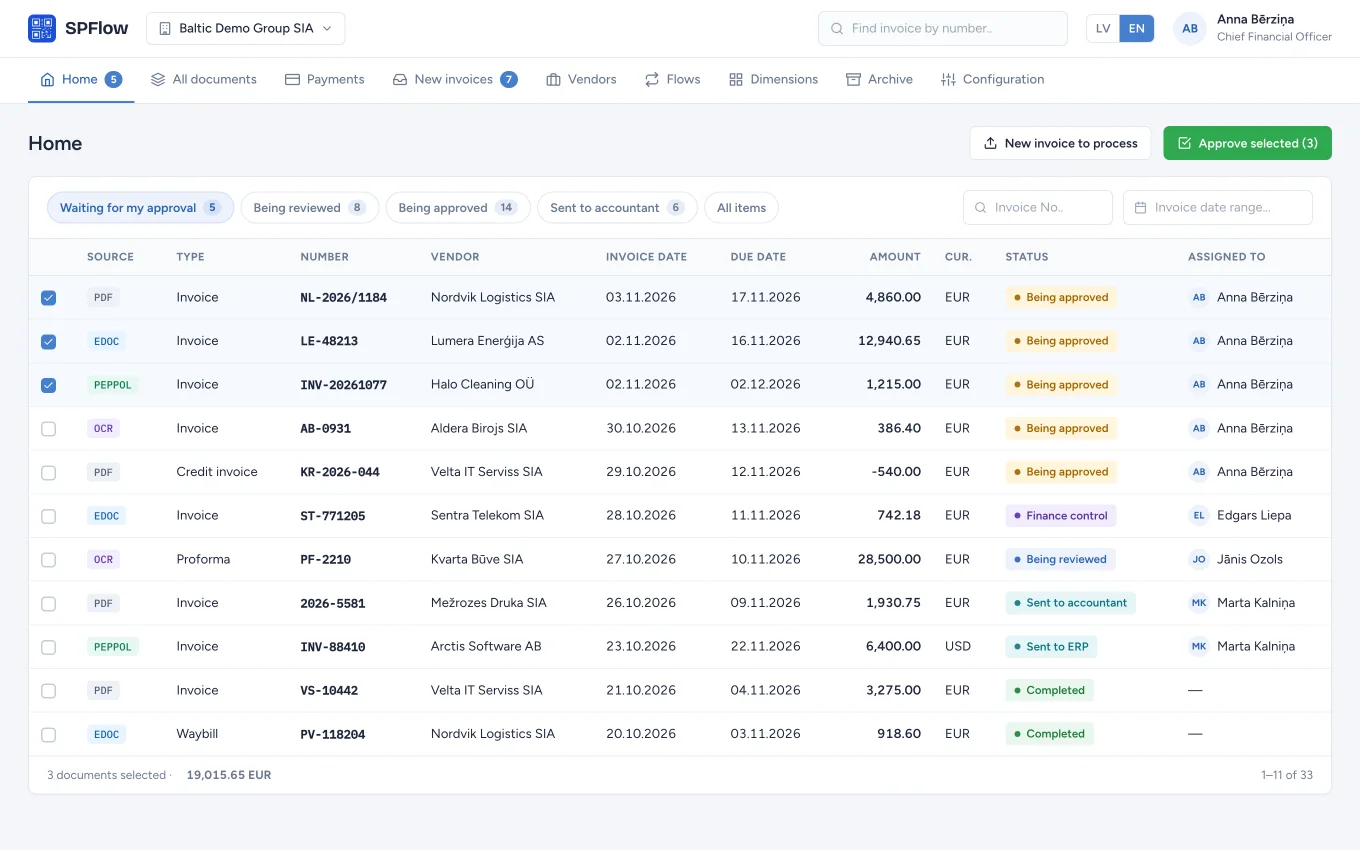
SPFlow home screen: a list of invoices assigned to me with statuses and an approve button

How it works

From inbox to ledger in four steps

  1. 1

    Capture

    Invoices arrive on their own: from company mailboxes, as EDOC or Peppol e-invoices, or uploaded by hand.

  2. 2

    Recognition

    OCR reads PDFs and scanned documents, and AI suggests posting lines from the vendor's history.

  3. 3

    Approval

    The invoice reaches the right people in the right order. They get an e-mail notification and decide in one click.

  4. 4

    Posting and payment

    Only approved invoices reach your ERP. Prepare the payments in the same place and send them to the bank.

Features

The whole invoice journey in one system

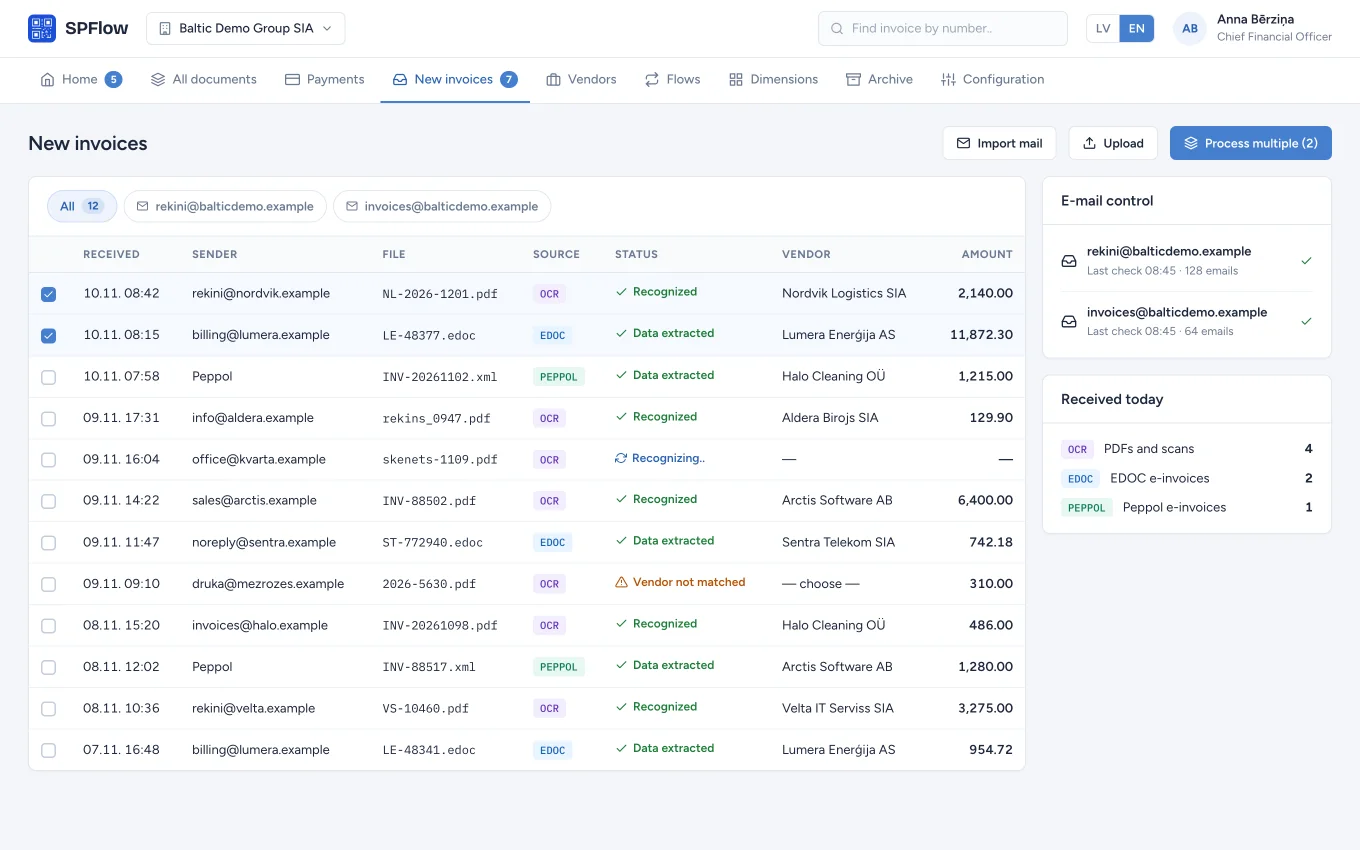
List of new invoices with their source (OCR, EDOC, Peppol), recognition status and mailbox control

Invoice capture

Connect your company mailboxes and SPFlow picks up the attachments itself. E-invoice data is read straight away, with no retyping.

  • Microsoft 365 and IMAP mailboxes
  • EDOC and Peppol e-invoices, PDFs and scans with OCR
  • E-mail control shows what has arrived and what is still waiting
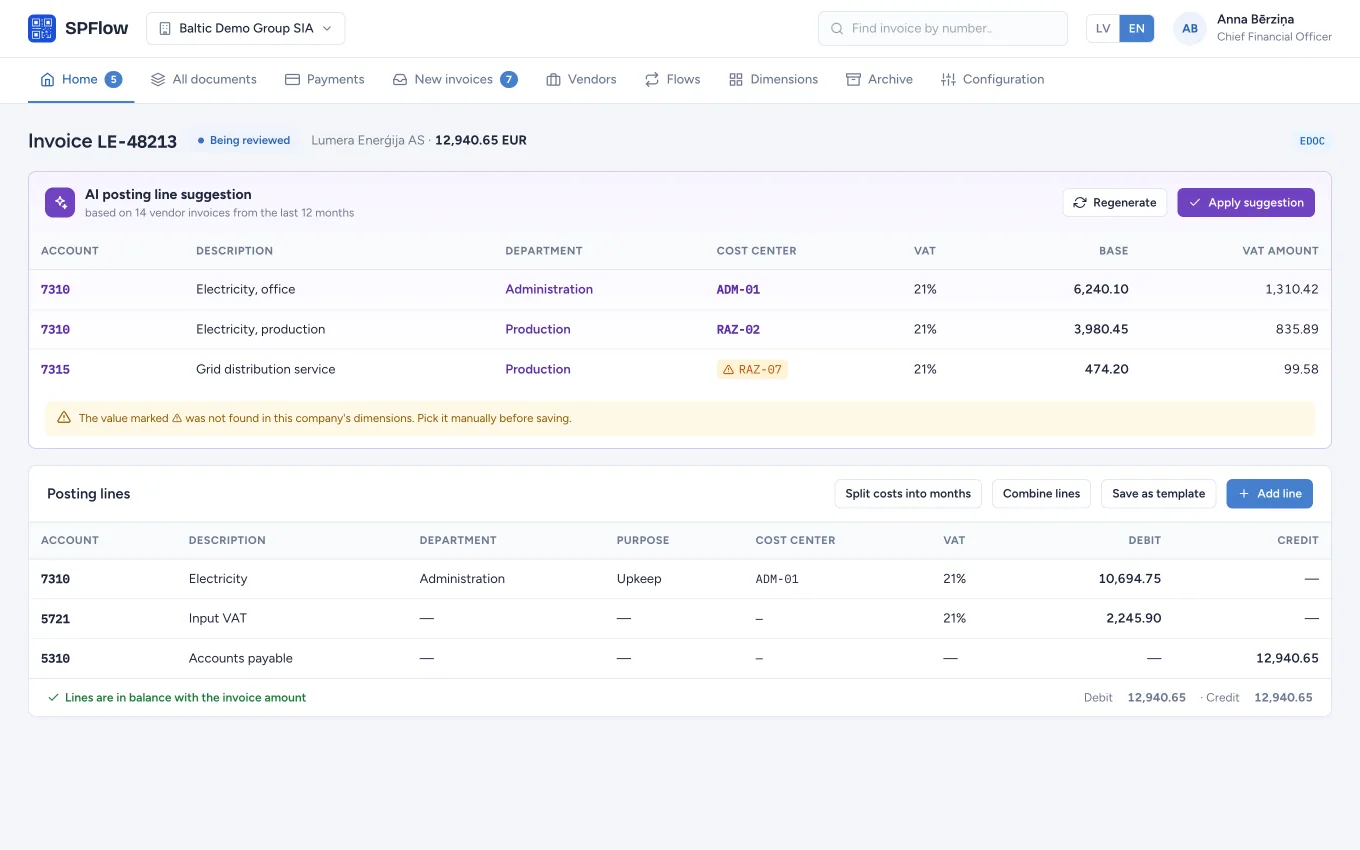
AI posting line suggestion with accounts, departments and cost centers above the invoice's posting lines

AI posting lines New

SPFlow uses each vendor's earlier invoices to suggest accounts and dimensions. The accountant reviews the suggestion and applies it with one button.

  • Suggestions come from your own posting history
  • A warning when a suggested value is missing from the company's dimensions
  • Posting templates, cost splitting by month and line combining
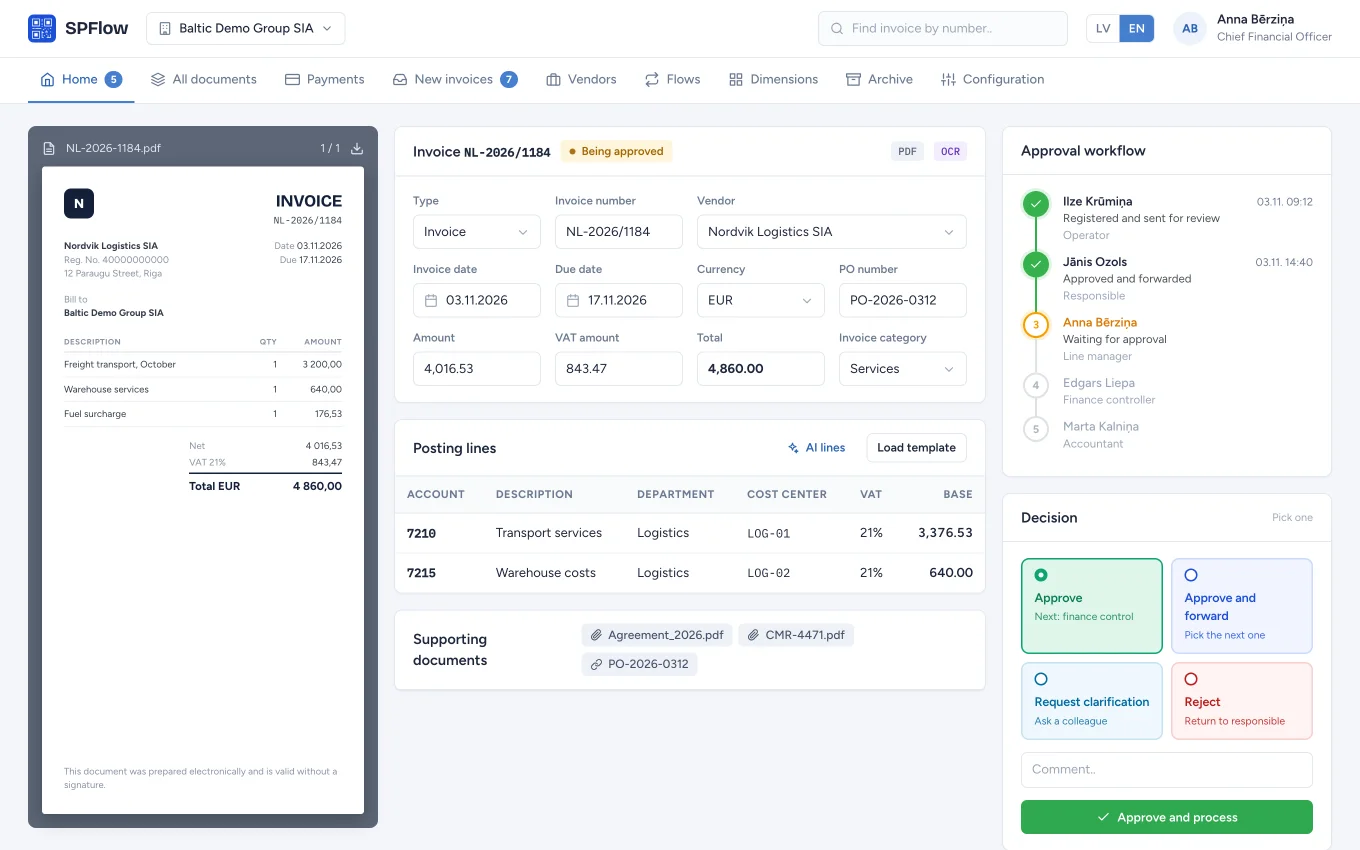
Invoice view with PDF preview, invoice data, approval workflow timeline and decision cards

Approval

The document, its data and the decision sit in one view. The flow timeline shows who has approved and who is next.

  • Approve, forward, ask for clarification or reject
  • Approve several invoices at once
  • Full history of decisions and comments on every document
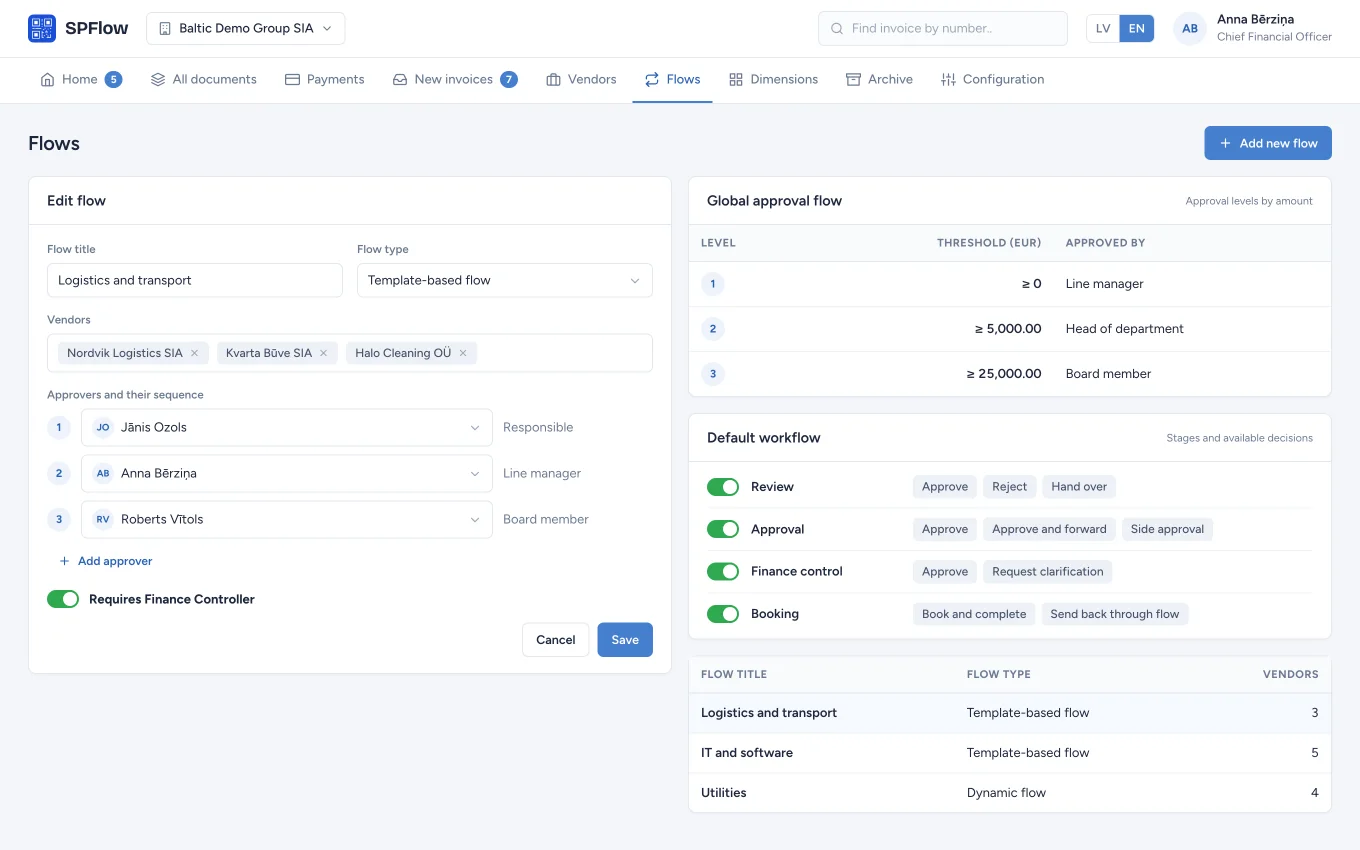
Flow editor with the approver sequence, global approval levels and default workflow stages

Flows and rules

Describe your approval procedure once. Flows can be tied to vendors, while amount thresholds and approval limits decide when one more approval is needed.

  • Template-based, dynamic and custom flows
  • Global approval levels by amount, plus per-user limits
  • A finance controller stage and selectable decisions at each stage
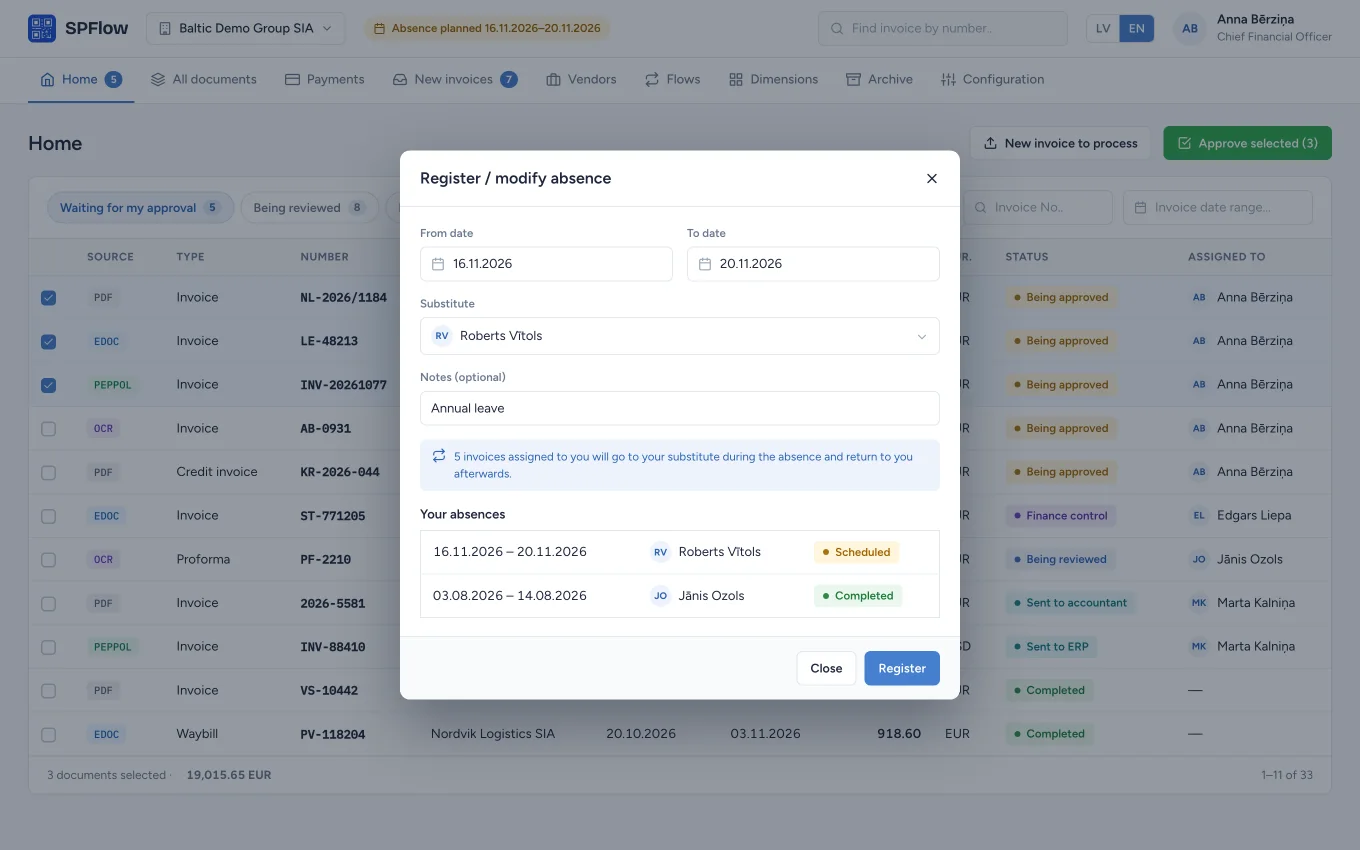
Absence registration dialog with dates, a substitute and a list of earlier absences

Absence and substitutes New

Holidays no longer hold invoices up. An employee registers the absence and a substitute, and SPFlow hands the invoices over and returns them afterwards.

  • Assigned invoices and flow steps pass to the substitute
  • Everything returns to the owner when the absence ends
  • Every substitution is recorded in the document history
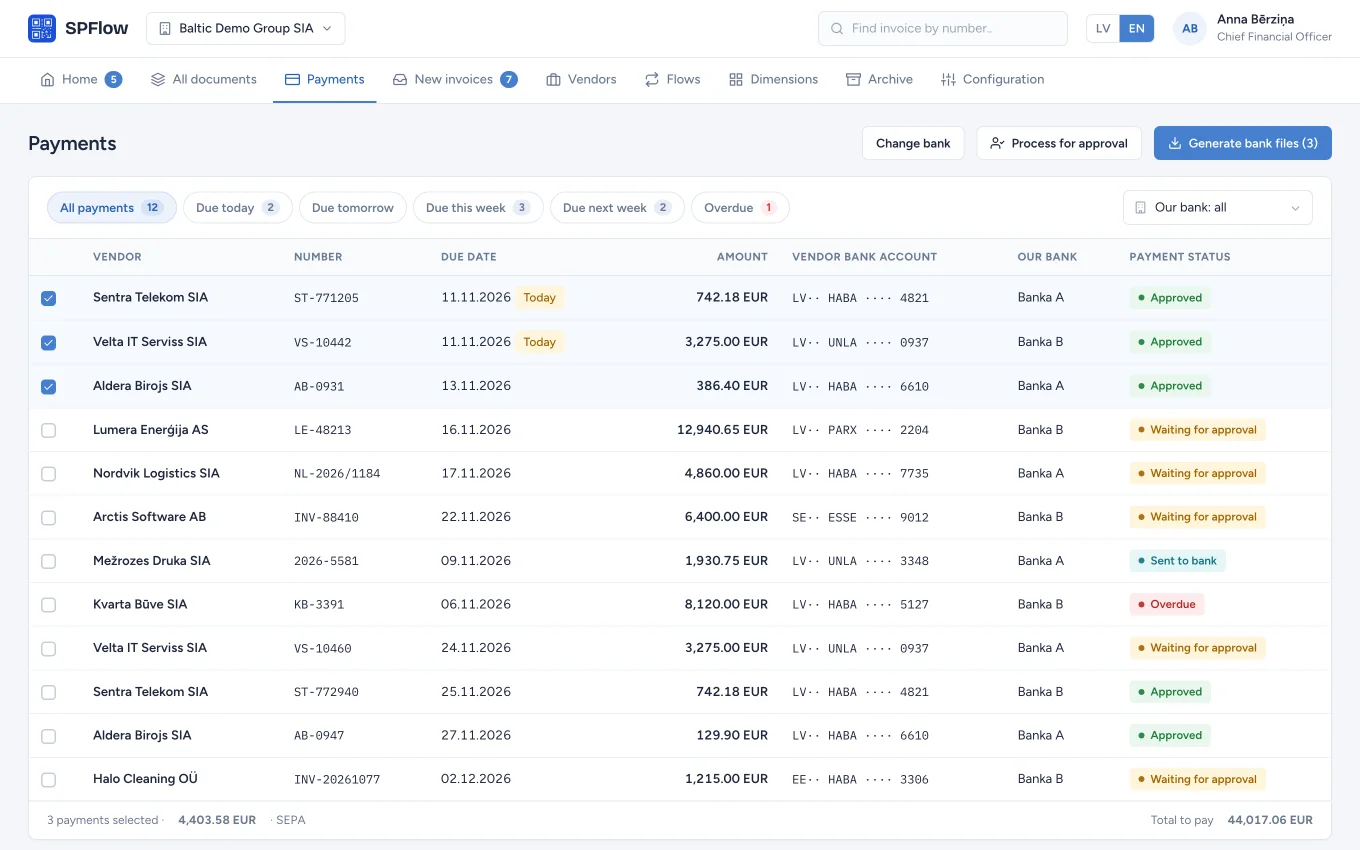
Payments list with due dates, vendor bank accounts, payment statuses and bank file generation

Payments New

Approved invoices are sorted by due date. Choose what to pay, get the payment approved and generate the file for your bank.

  • Views for today, this week, next week and overdue
  • A separate payment approval step
  • SEPA payment files for several banks
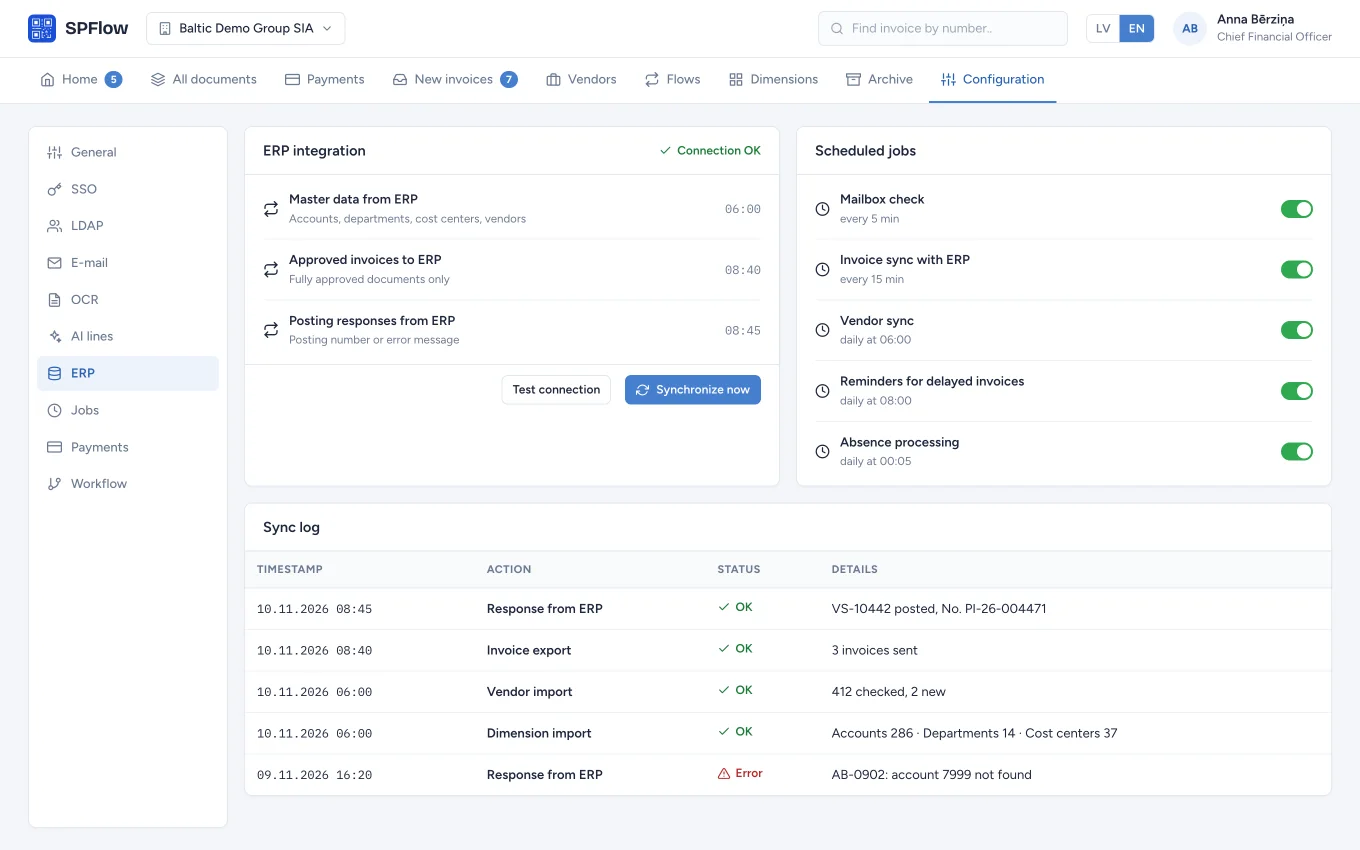
ERP integration settings with sync directions, scheduled jobs and the sync log

ERP integration

Two-way exchange with your accounting system. Accounts, dimensions and vendors come from the ERP, approved invoices go to it, and the posting number comes back.

  • Direct connection to Microsoft Dynamics NAV and Business Central
  • XML file exchange for other ERP systems
  • Sync log and scheduled jobs

The screens show demo data.

Also included

And everything else the daily work needs

  • Multi-company

    Unlimited legal entities in one system, each with its own settings and roles.

  • Roles and permissions

    Each user sees only the documents and mailboxes meant for them.

  • Purchase orders New

    Orders with their own approval, periods and linked invoices.

  • Investment projects New

    Track a project's invoice total from opening to closing.

  • Customisable document card

    Choose which fields are visible, mandatory or read-only.

  • Related documents

    Attach agreements, waybills and other supporting files at any stage.

  • Notifications and reminders

    An e-mail for every new task and reminders for delayed invoices.

  • Search and export

    Find an invoice by number from any screen, filter the lists and export to Excel.

  • Archive

    Completed documents are kept by year together with their full history.

  • Dimensions and VAT

    Accounts, departments, cost centers, VAT rates and currencies. Copy them between companies.

  • Secure sign-in

    Microsoft Entra ID, LDAP and Active Directory, or SPFlow user accounts.

  • Two languages New

    Each user works in Latvian or English.

Integrations

Fits the systems you already run

SPFlow works with what you already use: your accounting system, e-mail, e-invoice formats and company user accounts.

Accounting
Microsoft Dynamics NAVMicrosoft Dynamics 365 Business CentralXML exchange with other ERPs
Invoice sources
Microsoft 365IMAPEDOCPeppolPDF + OCR
Sign-in
Microsoft Entra IDLDAP / Active Directory
Output
SEPA payment filesExcel

Pricing

Choose where SPFlow runs

Every plan is available in the cloud or on your server.

  • Up to 20 users

    500 invoices a month included

    In the cloud

    €399per month

    On your server

    €3,999one-time licence

    Request a demo
  • Unlimited users

    5,000 invoices a month included

    In the cloud

    €999per month

    On your server

    €9,999one-time licence

    Request a demo

Above the included volume: €0.10 for each further invoice.

One-time setup fee: from €1,500 in the cloud and from €3,000 on your server. ERP integration is quoted separately.

Included in every plan

  • OCR and AI posting lines
  • Multi-company support
  • EDOC support
  • Approval flows
  • Batch approvals
  • Related and supporting documents

Talk to us to pick the plan that fits.

FAQ

Frequently asked questions

How do invoices get into SPFlow?

SPFlow regularly checks the Microsoft 365 or IMAP mailboxes you connect and picks up the attachments. EDOC and Peppol e-invoice data is read automatically, and OCR recognizes PDFs and scanned documents. You can also upload documents by hand.

Which accounting systems does SPFlow work with?

SPFlow connects to Microsoft Dynamics NAV and Microsoft Dynamics 365 Business Central. For other ERP systems there is an XML file exchange. In every case accounts, dimensions and vendors come from the ERP, approved invoices go to it, and the posting number or an error message comes back.

Does SPFlow run in the cloud or on our own server?

Both. The cloud plan needs no servers. If you prefer to keep the data in your own infrastructure, SPFlow is installed on your server.

Can the approval procedure match the way our company works?

Yes. Flows can be built from templates or set per invoice, and tied to vendors. Amount thresholds and per-user approval limits add further approvers, and a finance controller stage can be switched on when you need it.

Which documents can it process?

Invoices, credit invoices, proformas, waybills and return waybills, as well as purchase orders. Related and supporting documents can be attached to each one.

How do users sign in?

With the company's Microsoft Entra ID account, through LDAP or Active Directory, or with an SPFlow user account. Roles and permissions are set separately for each company.

What happens when an approver is away?

The employee registers the absence and names a substitute. For that period their invoices pass to the substitute, and return when the absence ends.

Contact

Let us show you SPFlow in action

Write to us and we will arrange a time for a demo.

Or write directlysales@smartperformanceflow.com

We use your details only to reply to this message.